Table of content
Master Solopreneur Customer Service: Scale Support Without Burnout
Nov 28 2025
Table of content
Being a solo entrepreneur is exhilarating. You have total freedom, total control, and total ownership. But it also means you are the "Chief Everything Officer." You are the marketing department, the sales team, the product developer, and perhaps most exhaustingly, the customer support agent.
Nothing kills your flow state faster than a "Where is my order?" email popping up in the middle of deep work. Yet, in a world where 90% of customers rate an "immediate" response as essential, you can't just ignore them.
This is the solopreneur's dilemma: How do you provide world-class support without working 24/7?
The answer isn't to work harder; it's to build a system that works for you. In this guide, we will break down how to handle customer service as a solopreneur by leveraging automation, setting boundaries, and using tools that don't break the bank.
The Solopreneur Support Trap: Why You Feel Overwhelmed
Before we fix the problem, we need to understand the trap. Most solopreneurs treat customer service as an interruption rather than a process. You check emails sporadically, reply from your phone at dinner, and reinvent the wheel with every response.
This "reactive" approach leads to decision fatigue. When you are the only person manning the ship, every minute spent answering repetitive questions is a minute not spent growing your business.
Unique Insight: The goal of solopreneur customer service isn't to delight every customer with a handwritten note; it's to solve their problem with the least amount of friction possible. Efficiency is the new empathy. A fast, automated answer is often valued higher than a slow, personalized one.
Step 1: Set Boundaries (The "Velvet Rope" Strategy)
You cannot be available 24/7. If you try, you will burn out, and your business will fail. The first step to managing support is managing expectations.
Define Your "Service Hours"
Make it clear when you are online and when you are not. Put this in your email signature, on your contact page, and in your social media bios.
- Example: "Support Hours: Mon-Fri, 9 AM - 5 PM EST. We typically reply within 24 hours."
The Auto-Responder is Your First Line of Defense
Set up an email auto-responder that manages the customer's anxiety immediately.
- Acknowledge: "I've received your message."
- Set Expectation: "I'm a one-person shop, so I reply to all emails personally within 24 hours."
- Redirect: "While you wait, check out my FAQ page [Link] the answer might be there!"
This small step stops the "Did you get my email?" follow-ups that clog your inbox.
Step 2: Automate First, Hire Later (The Smart Way)
The standard advice for overwhelmed solopreneurs is "Hire a Virtual Assistant (VA)." While valid, this is expensive and requires management. Before you hire a human, you should hire a robot.
Why Automation Beats Hiring for Solopreneurs
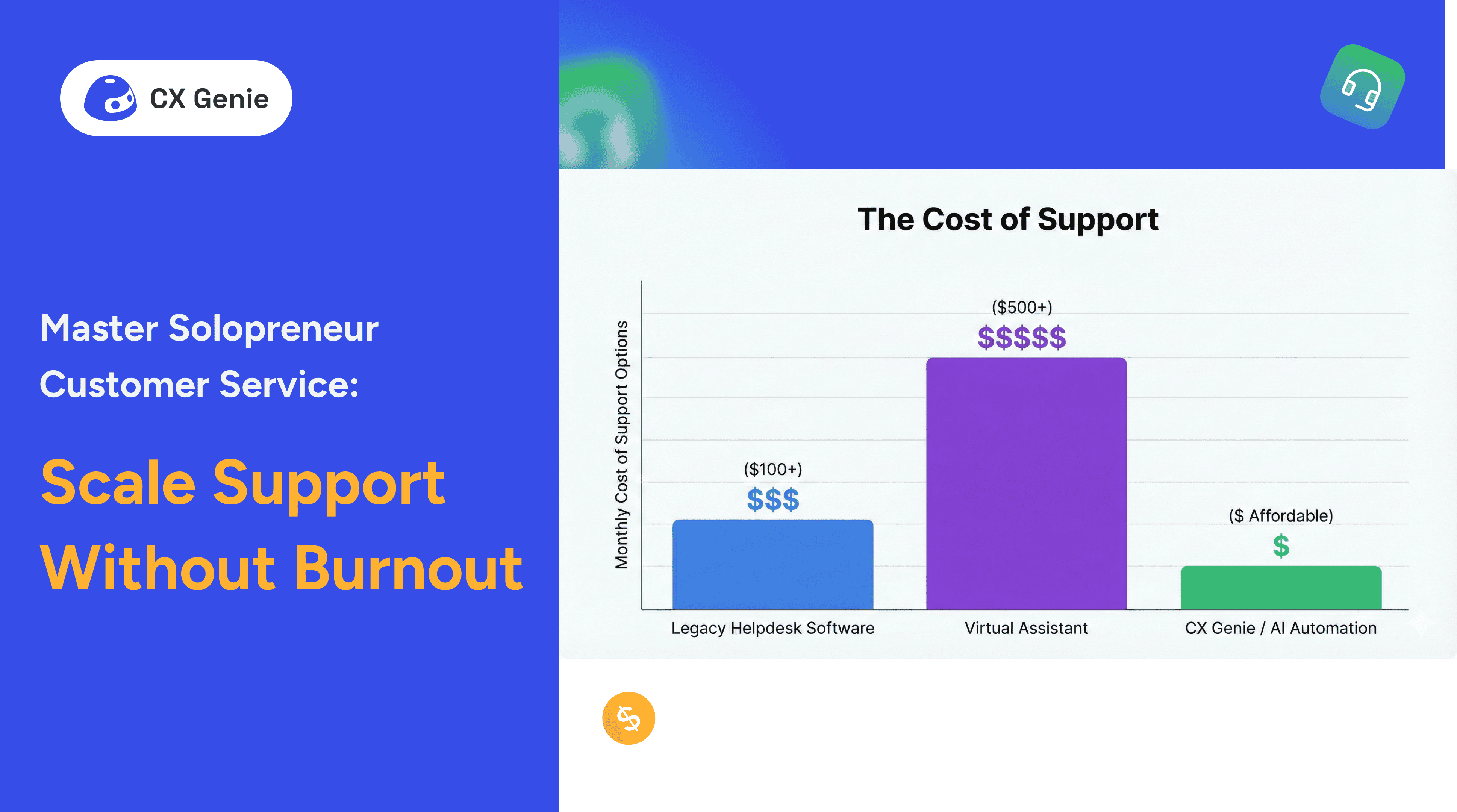
A VA costs anywhere from $500 to $2,000 a month. They need training, they sleep, and they get sick. An AI tool works 24/7, requires zero breaks, and costs a fraction of the price.
This is where CX Genie becomes a game-changer for the solo entrepreneur.
The Affordable AI Solution: CX Genie
Legacy tools like Zendesk or Intercom are fantastic, but they are priced for enterprise teams with deep pockets. They are overkill for a solopreneur.
CX Genie is designed to fill this gap. It acts as your 24/7 support agent, sitting on your website to intercept questions before they ever reach your inbox.
- Instant Answers: It answers repetitive questions (pricing, refunds, hours) instantly.
- Lead Capture: It qualifies leads while you sleep.
- Cost-Effective: Unlike competitors that charge per "seat" or have massive monthly minimums, CX Genie offers pricing significantly cheaper than major tools, making it accessible for a bootstrap budget.
By using an affordable AI chatbot, you essentially clone yourself for less than the cost of a daily coffee.

Step 3: Build a "Self-Service" Machine
The best customer service interaction is the one that never needs to happen. If a customer can find the answer themselves, they are happier, and you are undisturbed.
The Power of a Living Knowledge Base
Every time you get a new question via email, ask yourself: "Is this on my website?" If not, add it. Over time, this builds a robust Knowledge Base (KB).
- Tip: Don't just write text. Record short Loom videos showing how to solve the problem. It’s faster for you to create and easier for them to consume.
Organizing Your FAQs
Group your FAQs by category (e.g., "Billing," "Shipping," "Product Usage"). A well-organized FAQ page creates a customer support strategy that scales infinitely without requiring more of your time.
Step 4: Streamline Your Workflow with Systems
For the queries that do require a human touch (complex issues, refunds, angry customers), you need to be lightning fast.
Master the Art of Canned Responses
Never type the same email twice. Use tools like Gmail Templates or TextExpander to create shortcuts for common replies.
- Snippet: ;refund -> "Hi there, I've processed your refund. It should appear in your bank account within 3-5 business days."
This transforms a 5-minute task into a 5-second task.
Integrate Productivity Hacks
Managing support is just one slice of the pie. To truly succeed, you need to integrate your support workflow with your broader productivity system.
For example, "batching" your support time (only checking emails at 9 AM and 4 PM) is crucial. For more deep-dive strategies on how to organize your entire business day, check out our guide on 5 Small Business Productivity Hacks for Solopreneurs. It covers the essential mindset shifts you need to move from "busy" to "effective."
Quick Takeaways
- Set Boundaries: Define clear service hours and use auto-responders to manage expectations immediately.
- Automate Before Hiring: Don't rush to hire a VA. Use affordable AI tools like CX Genie to handle 24/7 support for a fraction of the cost.
- Self-Service is King: Build a robust Knowledge Base so customers can answer their own questions without emailing you.
- Batch Your Work: Check support tickets only during specific time blocks to protect your deep work focus.
Conclusion
Learning how to handle customer service as a solopreneur is a journey of letting go. You have to let go of the idea that you need to personally touch every interaction. You have to let go of the guilt of not being available 24/7.
Your business needs you to be the CEO, not the support agent. By building a system that relies on clear boundaries, self-service content, and powerful automation tools like CX Genie, you can provide professional, timely support without sacrificing your sanity.
Remember, the goal is not just to answer tickets, it's to build a business that runs smoothly, even when you step away from the keyboard. Start small. Automate one thing today. Your future self will thank you.
Ready to reclaim your time? Start automating your support today with a tool built for your budget.
Frequently Asked Questions (FAQs)
1. What is the best customer service tool for a solopreneur on a budget? For solopreneurs, cost and simplicity are key. While Zendesk is popular, it can be expensive. CX Genie is a superior alternative because it offers powerful AI automation at a price point specifically designed for small businesses, making it much cheaper than other tools like Intercom.
2. How can I manage customer support without hiring a Virtual Assistant? You can replicate the work of a VA using AI. A chatbot can answer common questions, check order statuses, and route complex issues to your email. This allows you to manage customer inquiries alone without the overhead of an employee.
3. How much time should a solopreneur spend on customer service? Ideally, no more than 30-60 minutes a day. If you are spending more, you need better self-service resources (FAQs) or better automation. Batching this time into one or two blocks (e.g., morning and evening) helps prevent distraction.
4. Is a chatbot impersonal for a small business? Not if used correctly. Customers value speed over personality for simple questions. Using an affordable chatbot for your website ensures they get an instant answer at 2 AM. You can still add your personal touch to the complex queries that require email.
5. How do I stop customer emails from interrupting my work day? Turn off notifications. It sounds simple, but it's the most effective small business productivity hack. Schedule specific times to check your inbox (e.g., 10 AM and 3 PM) and stick to them. Use an auto-responder to let customers know when you will reply.
We Want to Hear From You!
Are you currently drowning in support emails, or have you found a system that works? What's the one tool you couldn't live without?
If you found this guide helpful, please share it with other solopreneurs who need to reclaim their time.
References
- Groove. (2024). The Solopreneur’s Guide to Customer Support. (Discusses the importance of tone and canned responses).
- Zapier. (2024). How to automate your customer support. (Breakdown of automation workflows).
- Harvard Business Review. (2011). The Short Life of Online Sales Leads. (Data regarding the importance of response times).
Forbes. (2023). Why AI is the Future of Solopreneurship. (Analysis of cost-savings via AI tools).




Join our newsletter!
Related articles